Short answer
A webcam is only as good as its light, angle and mounting. Do not pay for resolution before fixing the room and camera position.
Buying criteria
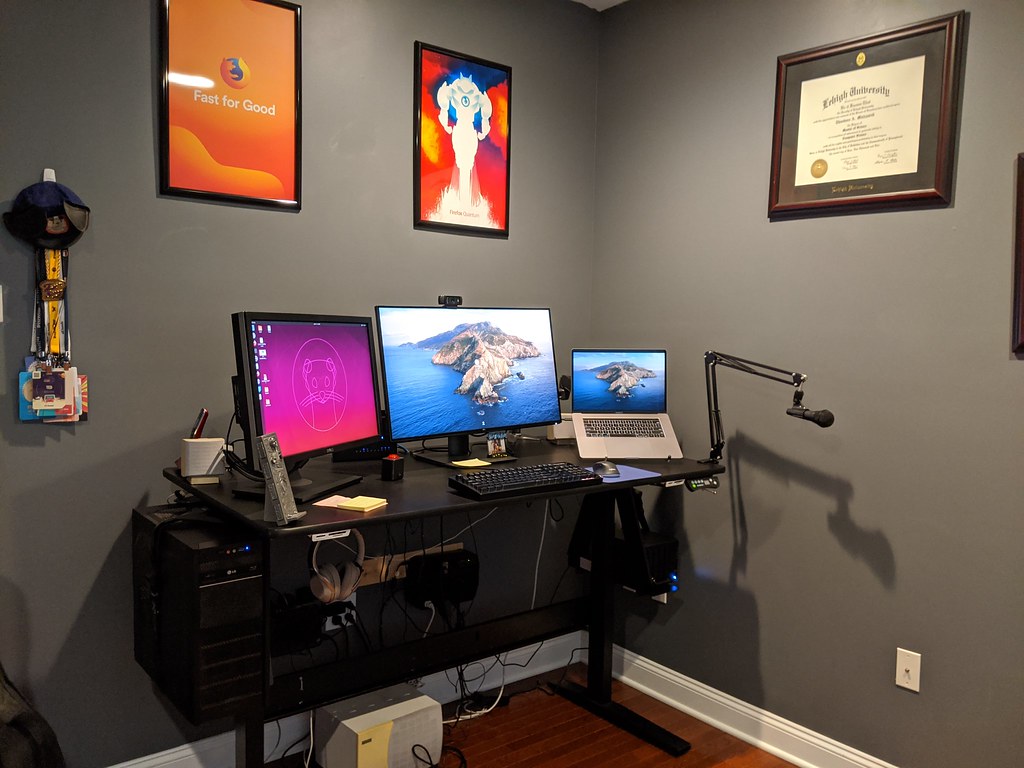
Mounting on monitor or laptop stand
Field of view for one person or small room
Low-light behavior with your lamp setup
Autofocus and exposure control
Privacy cover or physical disconnect
Microphone plan
Resolution is not the first decision
A sharper webcam can help, but resolution does not fix a dark room, a low angle or a messy background. Before shopping, place the camera at eye level, improve front light and decide how much of the room should appear on calls.
Many hybrid meetings compress video. A reliable 1080p camera with good exposure may look better than a higher-resolution camera pointed into backlight.
Field of view changes the story
A wide field of view can be useful for a small group at a table, but it may show too much of a home office. For one person, a moderate field of view usually looks cleaner and keeps attention on the face.
If the webcam software lets you crop, check whether the crop remains sharp enough. Digital zoom can reduce quality, but it may still be better than showing the whole room.
Mounting must match the screen
Some webcams sit securely on thick monitors but wobble on thin displays or laptop lids. Check the mounting foot, hinge and cable direction. If you use a monitor arm, make sure camera cable slack allows screen movement.
For stacked monitors or laptop-plus-monitor setups, test where your eyes naturally go during calls. A camera above a screen you rarely look at can make eye contact feel off.
Do not ignore audio
A webcam microphone can be enough in a quiet room, but it is rarely the best part of the device. If you share space, type during calls or have room echo, a separate microphone or headset may make a bigger difference than a more expensive camera.
Think of video and audio as a pair. Clear audio with acceptable video is usually better for meetings than sharp video with distracting sound.
Privacy and controls matter
A physical privacy cover, clear activity light or easy disconnect can reduce friction. Software controls for exposure and white balance are useful if your room lighting changes through the day.
Avoid fake claims about looking professional. The practical goal is simpler: clear face, stable framing, good audio and no surprises when the call starts.
Deskwise setup notes
Use this guide with real measurements rather than a mental picture of the desk. Measure the surface, the distance to power, the height of the chair when your arms are relaxed, and the space behind the monitor. Those numbers make it easier to reject gear that looks useful but will not fit the room.
Before buying, compare the product against these criteria: Mounting on monitor or laptop stand, Field of view for one person or small room, Low-light behavior with your lamp setup, Autofocus and exposure control. If two options look similar, choose the one with clearer dimensions, simpler returns and fewer assumptions about your room. If a product page hides weight limits, cable lengths or clamp requirements, treat that as a buying risk.
Also check the likely failure points: Buying 4K for a dim room, Using a wide field of view that shows clutter, Ignoring how the webcam attaches to a thin monitor. These are not edge cases for remote workers. They are common reasons a desk upgrade becomes another object to manage. A good purchase should make the workday easier to reset, clean and adjust.
Measurement and maintenance notes
Before using this buying guides advice as a shopping list, turn it into a small worksheet. Write down the desk width, desk depth, chair height, distance to the nearest outlet, monitor size, laptop size and the items that must stay on the surface every day. The numbers do not need to be perfect, but they should be real. A measured note beats a memory of how the room feels.
Use the criteria as a filter, not as decoration: Mounting on monitor or laptop stand, Field of view for one person or small room, Low-light behavior with your lamp setup, Autofocus and exposure control, Privacy cover or physical disconnect, Microphone plan. If a product page does not answer one of those points, pause before buying. Missing information is itself useful information because it tells you what you may need to confirm with the retailer, manufacturer manual or return policy.
Run a one-week trial when possible. Set up the item, work normally, then write down what became easier and what became more annoying. Good desk gear tends to disappear into the routine. Bad desk gear creates a new ritual: moving it aside, charging it constantly, cleaning around it, tightening it, or explaining why it still does not feel right.
Watch for these failure patterns: Buying 4K for a dim room; Using a wide field of view that shows clutter; Ignoring how the webcam attaches to a thin monitor; Relying on webcam microphones in noisy rooms; Forgetting USB cable length and port type. They show up because home offices are mixed-use rooms. A desk may be a work surface during the day, a study spot at night and a storage surface on weekends. Gear that only works in a staged photo can fail when the room returns to normal life.
If you share the workspace with a partner, child, roommate or occasional guest, favor reversible setup choices. Adjustable heights, movable lights, reusable cable ties and products with clear return terms reduce the cost of being wrong. Permanent adhesive routes, oversized furniture and single-purpose accessories should earn their place before they become part of the room.
Mistakes to avoid
- Buying 4K for a dim room
- Using a wide field of view that shows clutter
- Ignoring how the webcam attaches to a thin monitor
- Relying on webcam microphones in noisy rooms
- Forgetting USB cable length and port type
FAQ
Is 4K worth it for meetings?
Only if your software, bandwidth, lighting and framing can use it. Many people are better served by a good 1080p camera and better light.
What field of view should I choose?
For one person, moderate is usually cleaner. Wide angles can show too much background and distort the room.
Do webcam microphones work well?
They can work in quiet rooms, but a headset or separate microphone often improves clarity more than camera upgrades.
Should I use a privacy cover?
A physical cover or clear disconnect is a simple trust feature, especially on shared or always-connected desks.